


Industrial AR Glasses For Business: Professional Smart Eyewear
Views: 0 Author: Site Editor Publish Time: 2026-06-13 Origin: Site


Augmented reality has officially transitioned from an emerging technology into a standard enterprise tool. Today, forward-thinking organizations deploy wearable displays to solve complex operational challenges on a daily basis. However, decision-makers often struggle to move past the initial hype. Identifying hardware robust enough to survive real-world factory floors, hazardous field service environments, and stringent IT security protocols remains a major hurdle. Without a structured approach, organizations risk investing in fragile consumer tech masquerading as industrial gear.
This guide offers a vendor-neutral, evidence-based framework for evaluating your hardware options. You will learn how to align device capabilities to specific operational use cases. By doing so, you can effectively shortlist equipment, plan targeted pilot programs, and ensure you select the right device for your unique deployment.
Key Takeaways
Form follows function: Selection depends entirely on the use case—monocular devices for simple workflow checklists vs. binocular mixed reality for complex 3D spatial mapping.
Compliance is the bottleneck: Professional AR eyewear must integrate with existing PPE (hard hats, safety glasses) and meet specific environmental certifications (e.g., ATEX, IP66).
Software dictates hardware: A business AR device is only as effective as the enterprise software (remote assist, workflow guidance) and Mobile Device Management (MDM) platforms it supports.
Pilots require strict scoping: Successful enterprise rollouts rely on isolating a single, highly measurable friction point rather than deploying generic "hands-free" capabilities.
Framing the Business Case: Where Industrial Augmented Reality Yields Measurable ROI
Deploying new hardware often tempts companies into "innovation theater." In this trap, organizations buy headsets to appear modern without solving actual problems. To extract real value from industrial augmented reality, you must shift your focus entirely toward hard operational metrics.
Defining Success Criteria
A successful deployment hinges on tracking measurable KPIs. Leaders should track improvements in First-Time Fix Rate (FTFR), overall downtime reduction, and training cycle acceleration. When you measure these specific areas, the hardware proves its worth quickly.
High-Value Scenarios
Different operational challenges require distinct approaches. We see the highest return on investment in three primary scenarios:
Remote Expert Guidance: Junior technicians wear cameras on their heads, allowing remote Tier-3 specialists to see exactly what they see. This slashes travel expenses and dramatically reduces equipment downtime.
Digital Workflow & Inspection: Field workers perform hands-free documentation. They navigate checklists using voice commands and capture photo evidence of compliance, ensuring accurate auditing.
Complex Assembly: Technicians assemble intricate machinery guided by step-by-step visual overlays. This reduces cognitive load, minimizes manual reference checks, and slashes error rates.
Avoiding Pilot Purgatory
Many organizations launch a hardware pilot, declare it "cool," and then abandon it. Generic deployments fail because they lack focus. To escape pilot purgatory, tie your hardware selection directly to a quantified business pain point. If your biggest issue is error-prone manual inspections, select a device optimized specifically for voice-controlled checklists. Focus guarantees traction.
Solution Categories: Aligning the Business AR Device to the Environment
The market offers various wearable formats. Choosing the correct business AR device means aligning the hardware's physical design with your frontline environment. Below is a comparative chart outlining the three primary categories.
Device Category | Display Type | Primary Input | Best Suited For |
|---|---|---|---|
Monocular / Assisted Reality | Single Micro-display (2D) | Voice commands, head tracking | Heavy manufacturing, hazardous environments |
Lightweight Binocular AR | Dual transparent lenses (2D/3D) | Touchpads, mobile tethering | Logistics, warehousing, indoor QA |
Advanced Mixed Reality (MR) | Immersive spatial mapping | Hand tracking, eye tracking | Training, complex design reviews |
Monocular / Assisted Reality (aR)
These devices feature a single micro-display positioned just below or above the user's line of sight. They act like a tablet screen floating in your peripheral vision. They remain entirely hands-free, relying heavily on robust voice recognition software.
Best for: Oil and gas facilities, heavy manufacturing plants, and prolonged shift work. In these settings, extreme ruggedness and total situational awareness outweigh the need for immersive 3D graphics.
Lightweight Binocular AR Glasses
Binocular devices utilize a standard glasses form factor. They project digital overlays through transparent lenses into both eyes. They weigh significantly less than heavy headsets, making them comfortable for continuous wear.
Best for: Warehousing and logistics. They excel at "vision picking," where workers see directional arrows guiding them to specific inventory racks. They also serve well in clean indoor quality assurance environments.
Advanced Mixed Reality (MR) Headsets
These powerful headsets feature deep environmental mapping. They anchor 3D holograms to physical objects using advanced sensors and cameras. Users interact with digital elements via sophisticated hand-tracking.
Best for: Complex procedural training and collaborative design reviews. However, we do not recommend them for rough field service environments due to their heavier weight, fragility, and high battery consumption.
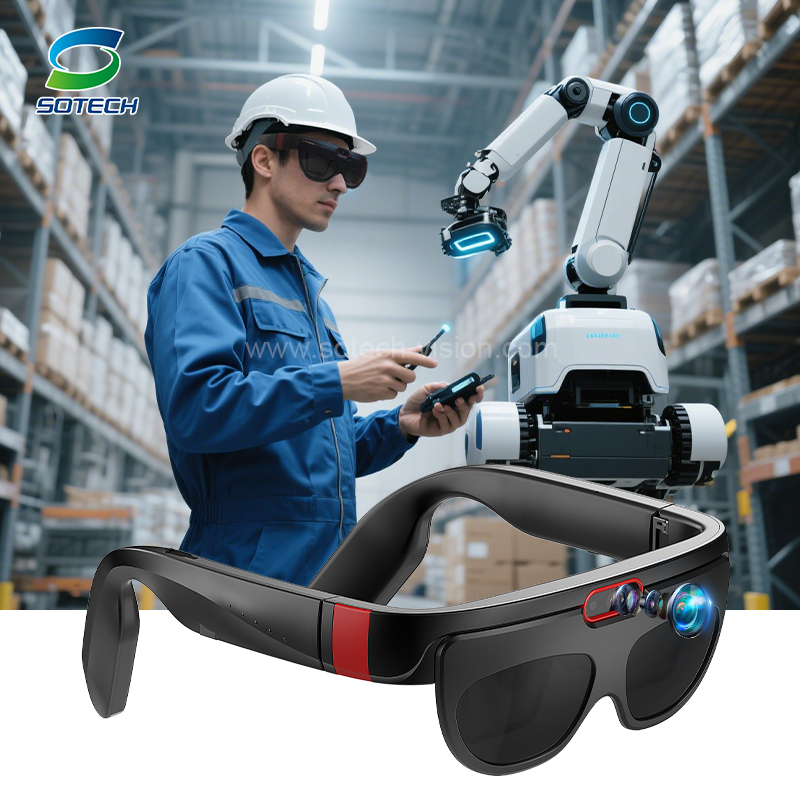
Key Evaluation Criteria for Professional AR Eyewear
You cannot evaluate wearable tech purely by its screen resolution. Selecting professional AR eyewear requires scrutinizing its physical resilience, power architecture, and enterprise security compliance.
Environmental Durability & Safety Compliance
Industrial environments destroy fragile electronics. Before purchasing, verify the Ingress Protection (IP) ratings. A rating of IP66 indicates strong protection against dust and heavy water jets. Look for standardized drop-test specifications to ensure survival after concrete impacts. Furthermore, evaluate extreme temperature operating windows if your workers face freezing cold or intense heat.
If you operate in explosive environments like chemical plants, intrinsic safety is non-negotiable. Look for strict ATEX or IECEx certifications. Finally, assess Personal Protective Equipment (PPE) compatibility. The headset must mount securely to existing hard hats and safety visors without compromising their protective integrity.
Shift-Life & Power Management
Power constraints often derail deployments. Manufacturers frequently state optimistic battery lives based on standby modes. You must evaluate these claims against the reality of continuous live video streaming, which drains batteries rapidly.
To prevent mid-shift downtime, prioritize devices featuring hot-swappable battery capabilities. This allows workers to replace depleted batteries without powering down the headset or losing their active software session.
Connectivity & IT Security
Hardware fails when connectivity drops. Factory floors contain massive metallic structures causing notorious dead zones. Address this by selecting devices with offline-first workflow capabilities and adequate local storage. When workers step back into a Wi-Fi zone, the device should automatically sync logged data.
Evaluate network flexibility. Look for robust dual-band Wi-Fi, modern 5G/LTE integration, and smartphone tethering options. Crucially, involve your IT department early. Ensure the device supports standard Mobile Device Management (MDM) enrollment, AES encryption standards, and strict data residency protocols.
Implementation Realities and Adoption Risks
Even the most rugged hardware will fail if users refuse to wear it. Successfully deploying enterprise smart glasses means understanding human factors and infrastructure bottlenecks.
Ergonomics and User Fatigue
Frontline workers will abandon uncomfortable devices. Pay close attention to the physiological impact of device weight. Heavy headsets strain neck muscles during long shifts. Additionally, test focal length and screen positioning. Poor display alignment causes intense eye strain and headaches. Lastly, ensure the hardware does not obstruct peripheral vision, which creates massive safety hazards near moving machinery.
The Software Compatibility Trap
Never buy hardware before verifying software compatibility. Some headsets run proprietary operating systems. Ensure your shortlisted devices natively support your required remote support platforms, such as TeamViewer, VSight, or customized Android APKs. Emulators often crash and deliver poor video framerates.
Infrastructure Limitations
Factory floors notoriously suffer from intense Wi-Fi interference. Heavy machinery and thick walls block signals. Address your connectivity architecture before buying a fleet of headsets. Upgrading warehouse access points or deploying a private 5G network often acts as a prerequisite for successful AR adoption.
Change Management
Frontline skepticism runs high regarding new technology. Workers often fear that cameras monitor their every move or that automation will replace them. Overcome this resistance through transparent change management. Involve end-users early in the ergonomics testing phase. When workers select the hardware they prefer, adoption rates skyrocket.
Shortlisting Logic: How to Pilot Enterprise Smart Glasses
Navigating the industrial ar glasses business landscape requires a disciplined testing approach. Follow this four-step logic to execute a flawless pilot.
Step 1: Map the Software First. Identify the digital platform needed to solve your operational problem. Once you choose the software, filter the hardware market by official compatibility. This prevents costly integration nightmares.
Step 2: The Physical Proof of Concept (PoC). Bring two to three shortlisted devices into the actual work environment. Do not test in a quiet boardroom. Test them while wearing thick work gloves. Evaluate voice command reliability against loud background machinery noise. Check display visibility under blinding outdoor sunlight and dim warehouse lighting.
Step 3: IT and Security Vetting. Hand the devices over to your cybersecurity team. Run them through strict network security protocols. Confirm they accept your company's MDM profiles and pass penetration tests before committing to large fleet purchases.
Step 4: Define the Go/No-Go Metrics. Establish hard numbers for pilot success prior to deployment. For example, mandate a "15% reduction in asset inspection time over 30 days." If the hardware fails to hit the metric, rethink the deployment strategy.
Conclusion
No single device reigns supreme across all industries. The right hardware choice remains highly contextual, depending entirely on your operational environment, security needs, and software preferences.
Always prioritize form factor based on the specific job—monocular for rough hands-free work, binocular for indoor guidance.
Demand rigorous safety and environmental certifications to protect both the worker and the equipment.
Secure IT approval regarding MDM and network connectivity before beginning physical trials.
Design pilots around a single, highly measurable pain point.
We encourage decision-makers to start small. Launch a narrow, highly structured pilot rather than rushing a fleet-wide rollout. Engage early and test rigorously. Consult with an integration specialist or request detailed specification comparisons tailored to your exact industry use cases.
FAQ
Q: Can enterprise smart glasses be used with prescription lenses?
A: Yes. Many industrial devices accommodate prescription wearers through specialized lens inserts that snap onto the frame. Alternatively, some monocular devices feature an adjustable boom arm, allowing users to wear them comfortably over their standard safety or prescription glasses without interference.
Q: What is the difference between Assisted Reality and Augmented Reality?
A: Assisted Reality provides a simple "data-in-view" experience, acting like a 2D dashboard floating in your peripheral vision. It does not interact with the environment. True Augmented Reality overlays complex 3D digital elements directly onto physical objects, understanding depth and spatial context.
Q: How much bandwidth is required for live remote expert video streaming?
A: For a stable, high-quality video feed, expect to need a dedicated 2 to 4 Mbps upload speed. However, robust enterprise software utilizes dynamic resolution scaling. This allows the stream to drop video quality automatically in low-bandwidth areas while keeping the audio connection alive.
Q: Are industrial AR glasses secure enough for defense and proprietary manufacturing?
A: Yes, provided you implement proper protocols. Secure devices support rigorous MDM integration, allowing IT to wipe data remotely or disable cameras. For top-tier security, many defense applications utilize on-premise software hosting and deploy headsets in completely air-gapped environments without external internet access.


